FM-1 · VERSION 2.0 / JOURNEY
A little path
through your worlds.
Journey connects up to eight musical sections. Let one sound world unfold into another, keeping a favourite bass line or texture alive across the change.
Open the playable workbench →
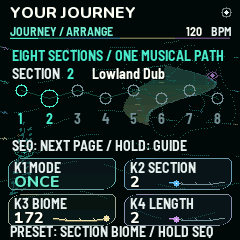 Arrange. Off, Once or Loop. Choose the section, its source Biome and the number of sections to play.
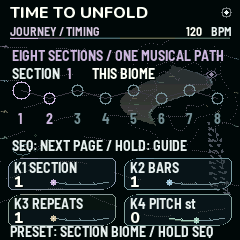 Timing. 1–64 bars, 1–16 repeats and a pitch offset for each section. One bar is sixteen sixteenth notes.
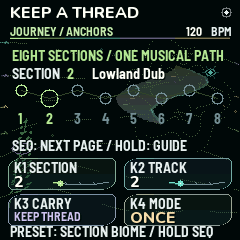 Anchors. Carry the selected track's sound, pattern and voice state into this incoming section. Shared macros and the new global root, scale and pitch still apply to subsequent notes.
Make your first Journey
- Start with a Biome you enjoy. Shape its sounds and sequence while stopped.
- Press SEQ through Sequence Flow, then Journey. From Kit Steps, press SEQ again. The browser also has direct Journey page buttons.
- In Arrange, set Mode = Once and Length = 2. Section 1 can stay on This Biome, which means your complete editable home Biome.
- Choose section 2 and select a factory Biome. PRESET also changes this section's source, without replacing your home project.
- Press SEQ for Timing. Set each section's bar length and repeats. Four bars is a gentle starting point.
- Press SEQ for Anchors. Choose an incoming section and a track; turn Carry on to keep that sound and pattern through its entrance.
- Press PLAY. The display follows the playing section. Unkept voices dissolve over the final sixteenth, incoming voices fade in, and shared grain, echo and room memories continue.
- Press Stop to restore your editable home Biome. Use GLO → User Banks to name and save the whole Journey in one of your sixteen Biome slots. SAVE outside Banks also stores the current project.
New MIDI performance guide →
At a glance
| Page | K1 | K2 | K3 | K4 |
|---|
| Arrange | Mode | Edit section | Source Biome | Journey length |
| Timing | Edit section | Bars | Repeats | Pitch offset |
| Anchors | Edit section | Incoming track | Carry | Mode |
Hold SEQ for the current page's guide. Releasing a long press opens no additional action. SEQ cycles Arrange → Timing → Anchors → Rhythm.
During playback: notes, temporary track mutes and live macros remain available. Stop before editing sounds, recording or changing the arrangement. Stop restores the home settings; temporary performance mutes and macros are not written into your project. Live patch export returns the canonical home Journey, not a transient section.
Listen to four sections
Felt Observatory → Lowland Dub → Dustlight Caravan → Tidepool Choir. Four bars per section at 90 BPM; track 2 is carried into the second section. This is an offline firmware-engine render, with a fixed preview gain and fades at the file edges.
What Journey supports
All 272 factory entries, including Blank, and your current custom home Biome can be a Journey source. Up to eight sections are stored with your User Biome and exported patch. PLAY starts at section 1. Stop restores your editable home project. Current saves use patch format v12 (2604 bytes); keep the pre-update backup for returning to 1.5.
Willow Bow, Aero Flute, Felt Mallet, Silk Ensemble, Copper Bloom, Vowel Bloom and the new Biomes are available to Journey. Authored factory effects now match direct recall, including the hand-percussion worlds. Living Links and captured Biome Drift are also available in Mutable Dreams 2.0; this guide describes the section arranger.
A kit rack has three synths and one kit. Across a kit/synth rack change, only tracks 1–3 can carry. In a kit-to-kit change, carrying track 4 also carries the entire kit. A muted carried track stays muted. Shared grain, delay and room memories continue; this is a section dissolve inside one active rack, not two simultaneous complete racks.
A Journey can reference factory sources and its own saved home Biome. Referencing several separate User Bank slots is not implemented. The undo buffer stages upcoming sections during playback; Stop restores the home project.