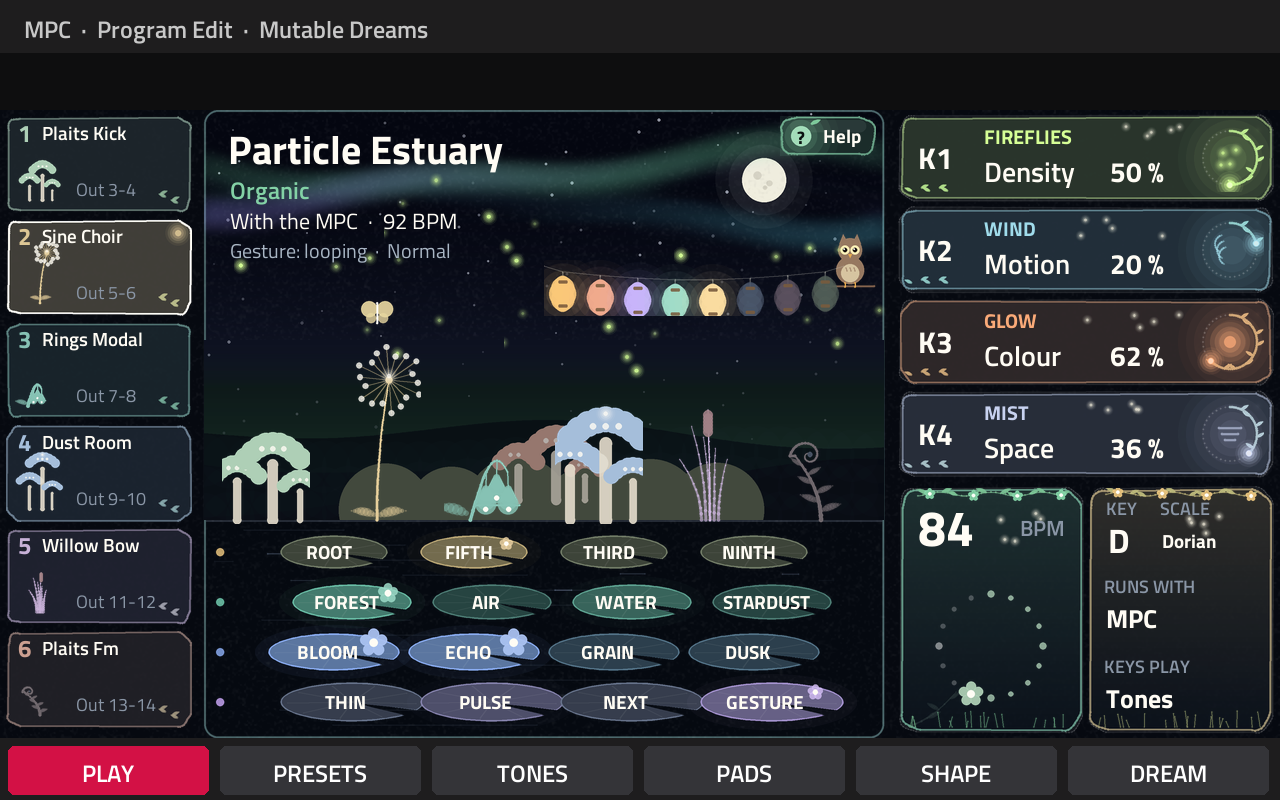
MPC / Product preview
A garden you can play.
Performance pads, Gesture, Worlds and playable instruments. Watch three original pieces and explore the interface. Gen-2 preview; older models are still being investigated.
Explore the MPC preview ↗Web Studio / FM-1 · 2.2
Begin with a Biome. Let six voices find their way, play a melody, or shape every detail. The same sound garden, here in your browser and on your FM-1.

Shape sounds here, or connect your FM-1 and edit it live. BROWSER
The browser and FM-1 keep separate User Banks. Connect with USB to use the hardware banks.
Hardware editing needs a compatible Mutable Dreams firmware and Web MIDI with SysEx (Chrome or Edge). Audio comes from the FM-1 while connected; the small display is a live parameter view. Export / Import below transfers one complete live Biome as a file. SAVE keeps it on the selected instrument. Full .mddb backups contain the saved project, preferences and all User Banks. Press SAVE before backup to keep recent favorites, Tone stars and Live List changes. Unsaved live edits, unsaved preferences, granular audio and calibration are excluded. A full restore requires STOP, internal clock, and physical SEL confirmation. Save changes before backing up, or export the live patch separately.
Before a firmware update: press SAVE for your project and preferences, back up all device banks as .mddb, and export your current live Biome as JSON. An unsaved favorite, Tone star or Live List edit is not part of the bank backup.
The black-and-mint FM-1, with the firmware’s own display. Play in the browser, or connect your device for live controls and screen mirroring.
BROWSERTurn your phone sideways for larger controls.
A Biome contains the complete instrument. If you have unsaved edits, you can keep editing, open User Banks to save, or explicitly discard and load. Factory Biomes always remain available.
Editable examples of sequences, Journey, Living Links and Drift. Start the instrument and stop playback before loading; save or export your current Biome first.
Six synth voices, or three synth voices and one Lo-Fi kit, rhythms, filters and effects are playable here. Start the instrument, select a voice, then explore its pages.
Patch files keep your six voices, patterns and settings. Stop before importing. User Banks stores 16 Biomes and 64 sounds in this browser; export keeps as many files as you like. In BROWSER mode, edits stay in this browser. After Connect FM-1, edits affect the selected device. The live granular recording is not stored.
Start the instrument to open your patch library.
Begin with Blank or any factory Biome. Shape your synth voices, kit and phrases, then use GLO → User Banks to select one of 16 Biome slots or 64 sound slots. Enter a name, stop playback, choose internal clock and save. In browser mode, an occupied slot requires a second Save within three seconds. The live FM-1 editor instead asks you to confirm replacement. Browser banks stay in this browser; hardware banks stay on the FM-1. Export each finished Biome as a file for safekeeping. Granular audio is not stored.
MIDI Learn: sixteen controller assignments with gentle pickup. Living Links: four connections between track hits, envelopes and slow LFOs. Biome Drift: capture A and B, then travel between them by hand or on a slow cycle.
Felt Observatory → Lowland Dub → Dustlight Caravan → Tidepool Choir. Four bars each at 90 BPM, with the second track carried into Lowland Dub. Rendered offline by the firmware engine, not recorded from the hardware.
Stop restores your editable starting Biome. Save the Journey inside a User Biome. Journey remains optional; the released 2.2 build has its own device test report.
You asked for Biomes that sound further apart, mute states you can read at a glance, more scales and independent MIDI control. Those ideas remain at the heart of 2.2. Journey can connect musical sections when you want an arrangement; open-ended generative playing remains available. Thank you for making music with this instrument and telling us where it can grow.
Choose a dream, its length, the pace of changes and the size of the room. The FM-1 engine draws the dream on the instrument display.
On the FM-1, open HOME · Itinera. Dreams move when LOOK / STARTUP shows K1 MOTION = LIVING.
Start the browser instrument to begin.
The Biome Atlas holds 275 musical Biomes plus Blank and 640 tone starting points. New in 2.2: a 16-position Live List, Tone stars, the HOME mixer, Voice Detail, timed Biome changes and hands-on dream macros. Add four Living Links and two captured Drift states to any Biome, or begin with Living Tidelands in Creative starting points. Sixteen MIDI-Learn slots keep your favourite controls close.
Bluetooth MIDI reception has been verified on one physical FM-1 for notes, CC74 and transport clock. USB and TRS input remain available. A separate BLE-MIDI sender that the FM-1 connects to, external TRS hardware and the newer UC25HQ80 board still need physical verification.
Updating can erase Favorites and personal / User Biomes. Back up all device banks as .mddb, export your edited live Biome separately and note your Biome Favorites and Tone stars. Open the 2.2 installer or read the illustrated guide. The exact UC25HQ80 hardware test for build 23F2FA0E is still pending. The owner has accepted the cold-start and listening tests on the existing FM-1. Version 2.0 stays available: 2.0 installer.
The Mutable Dreams family
Different ways to play, listen and explore. Each instrument has its own version and compatibility notes.
Performance pads, Gesture, Worlds and playable instruments. Watch three original pieces and explore the interface. Gen-2 preview; older models are still being investigated.
Explore the MPC preview ↗Sixteen expressive pads, recorded gestures and a full-size Stage in Sven’s VIBE FM. Browser and DAW preview for the VIBE Box Challenge.
Try Performance Garden ↗
Generative music and original compositions, from quiet rooms to gentle pulses. Listen while you explore; the radio pauses when you start the instrument.
Open Mutable Dreams FM ↗A pocket full of worlds is growing too: see the handheld development preview. SMK-37 is a separate adaptation in development. The FM-1 firmware download is for the FM-1.